



Ticketmaster’s interactive seat maps make it easy to find the seats you want for your next concert, game or show.
When you’re buying tickets, there’s a lot to think about, including the event date, ticket quantity, price, and seat location. With our interactive seat maps, you can see all of that information up front, which can help you make your decision quickly—especially when the clock is ticking and other fans may be shopping for tickets at the same time.
Here are a few tips to help you get the most out of the interactive seating chart.
What is Ticketmaster’s interactive seat map?
Ticketmaster’s interactive seat map is a search tool you can use when shopping for tickets that helps you quickly navigate the venue and find your seat. Maps show all available tickets, all in one place, including resale tickets sold by other fans, VIP packages and accessible seats.
How do I shop for tickets using the interactive seat map on Ticketmaster?
If you’re shopping on the Ticketmaster App, just tap a desired section to see a list of tickets and their prices. You can pinch to zoom in on the map and navigate around the venue. Select the tickets you want and tap Next to check out.
When shopping Ticketmaster.com on a web browser, click a section and hover over a seat to see price and details. You can zoom in on seats by clicking the section. Select the seats you want and click Next to check out.
If you see special offers, learn more about the offer by clicking the “?” next to the offer displayed.
Note: Selecting seats doesn’t make them officially yours, meaning another fan can still purchase them. The tickets are yours once you click Buy Tickets and complete your checkout.
What do the different colors mean on the Ticketmaster seat map?
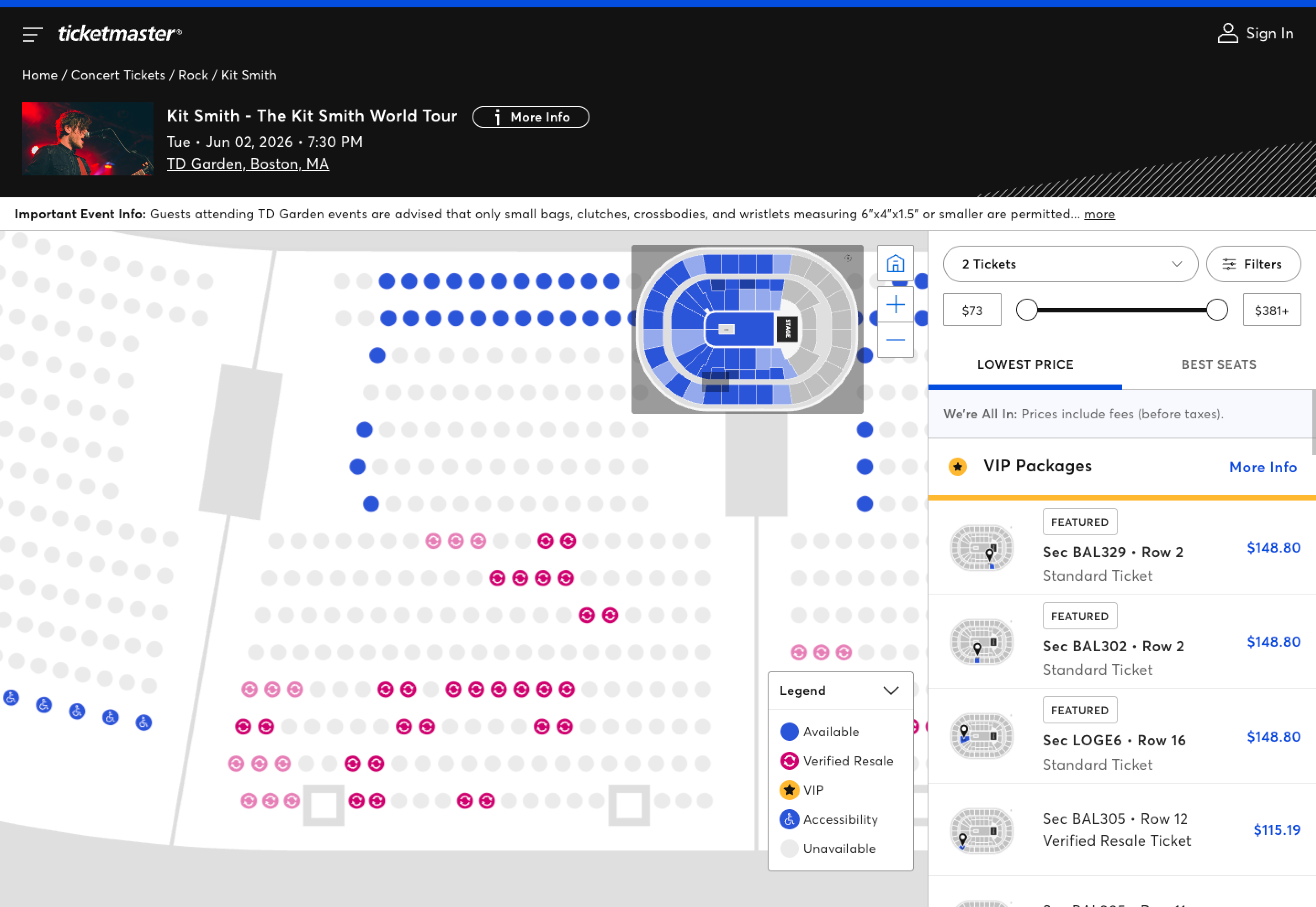
When looking at the interactive seating chart on Ticketmaster, you’ll notice seats in three different colors while purchasing tickets:
- Blue: This means the section has tickets available that match your search. The darker the blue in a given section, the more tickets in that section that match.
- Gray: If the section is grayed out, it means there are no more tickets available, or at least not any tickets that match your search.
- Pink: If you see a pink dot with the Verified Resale logo (two circling arrows), this means the tickets are being sold by other fans.
How do I use filters when shopping for tickets on Ticketmaster?
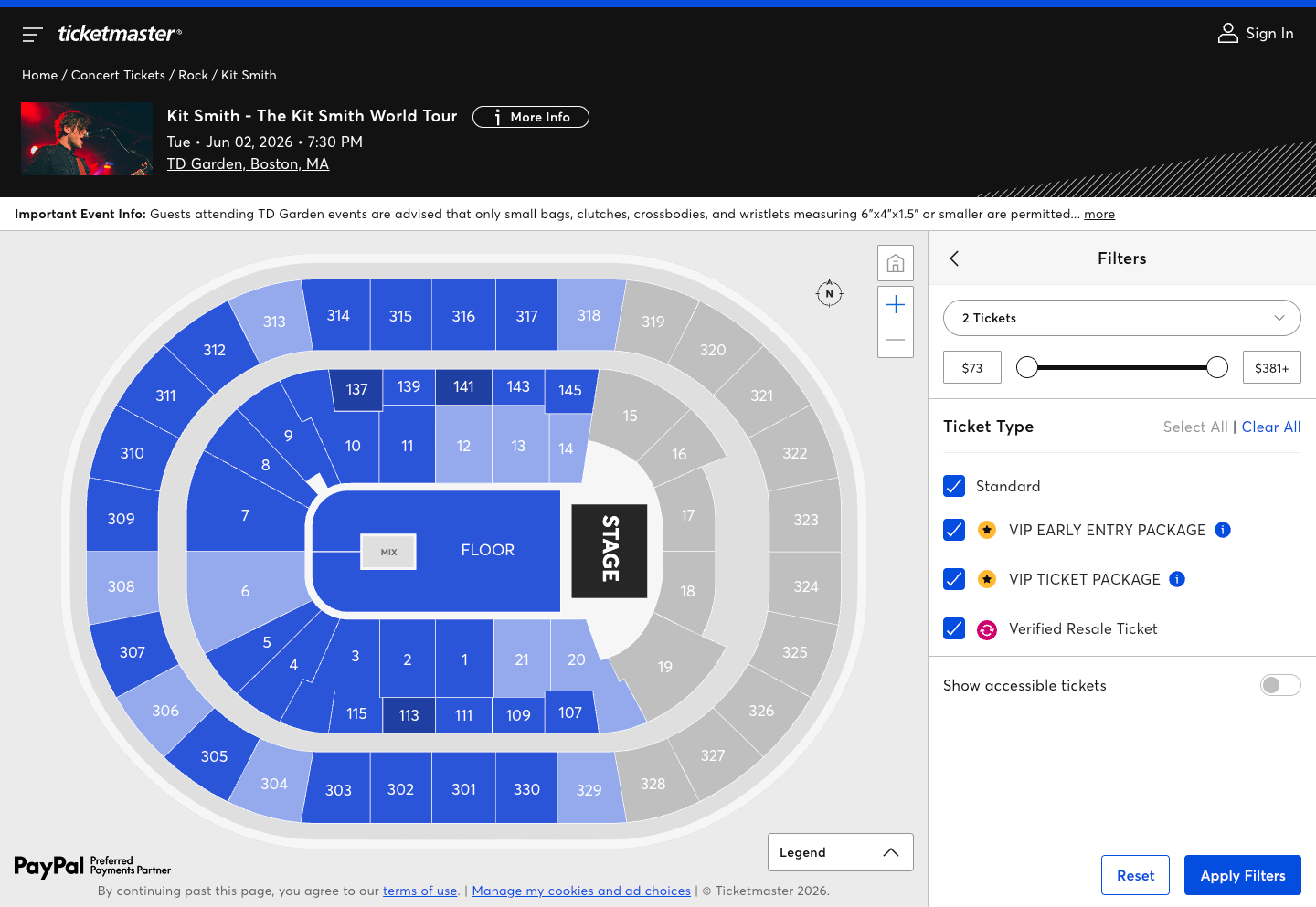
There are several ways you can narrow your ticket search by using filters on Ticketmaster while purchasing tickets. On the event page, you can filter tickets by:
- Quantity: You can typically search for 1 to 8 tickets, depending on the event.
- Price: A price slider (or dropdown, depending on the event) allows you to filter tickets by a specific price range. The tickets in your price range will turn dark blue, while tickets outside of your range will be grayed out.
- Ticket Type: By default, the seat map will show you all tickets available, including Standard Tickets, Verified Resale (if available) Tickets and VIP Packages. You can change this selection by unchecking the boxes. Right below, you can also toggle to show accessible tickets.
- Special Offers: If special offers are available, you can narrow your search by clicking on the desired option. Note: Some special offers require a code to unlock.
Review & Buy Tickets
Once you’ve selected your tickets, hit Next. You’ll see the total price up front, and a breakdown of the fees at checkout. Select your payment method — you can use a stored payment method, add a credit card, or use a payment platform like PayPal, Venmo or Klarna. Review your final order, read and agree to the Terms of Use and Standard Purchase Policy, and select Place Order to secure your tickets.
You can also add ticket insurance via Allianz, which guarantees you a full reimbursement in the event of select, covered emergencies and circumstances.
Can I buy seats without using the map?
While it does show you the layout of the venue, you don’t have to use the seating chart to search for the seats you want. You can simply use the Lowest Price or Best Seats section on the righthand side and filter your tickets that way.
What if I have a presale or offer code?
If you have a code, look for the Unlock button next to the Filters button from the artist or event’s page on Ticketmaster. Once you enter your code and click Unlock, you’ll be able to view available seats on the map. If you’re entering a presale that has a queue, you may need to wait in the queue first, then provide the presale code once it’s time to shop. Learn more about how ticket presales work.
Once you get the tickets, share that you’re going on social media so your friends and family can join in too!
Tags
You Might Like
Music
How Face Value Exchange Works
Ticketmaster’s Face Value Exchange gives fans, not scalpers, the best chance to buy tickets at the original price set by the artists. Face Value Exchange als...
Sports
They Shoot, You Score: How To Buy NHL Tickets
It’s time to let your hockey plans take the ice, as the 2025-26 NHL season is underway. Whether you’re in the stands every season or picking your seats right...
Music
You Can Now Buy Ticketmaster Tickets with Alexa+
“Hey Alexa, I’m in Philadelphia this week, find me tickets to a Flyers game!’ If you have an Amazon Alexa+-enabled device, you’re now just a voice command aw...